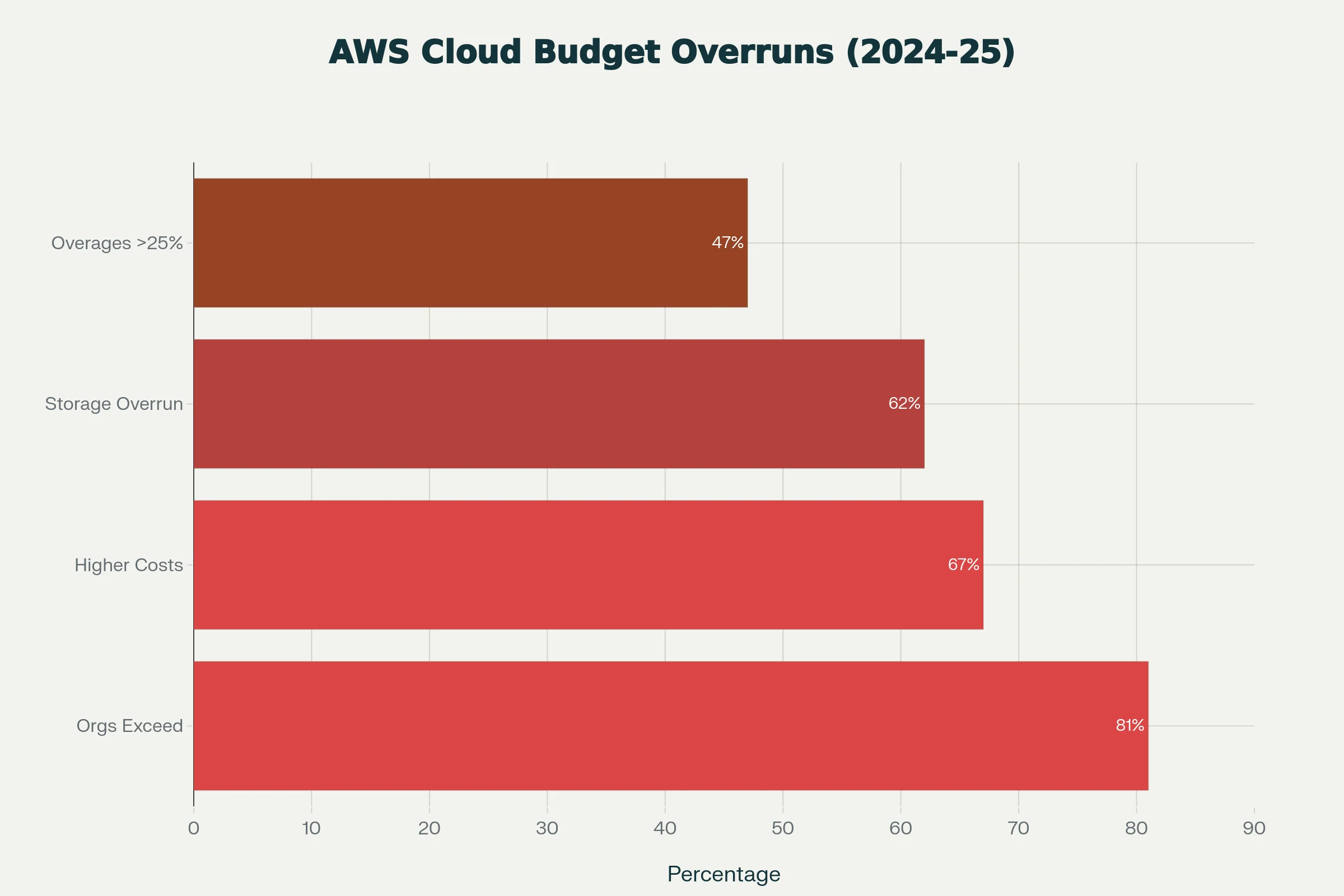
81% of organizations now exceed their cloud budgets and 27% of cloud spend is pure waste, climbing to 55% in teams without a real optimization process. AWS bills surprise people for the same reasons every time: pricing that's hard to model, resource sprawl that compounds quietly, and auto-scaling that does exactly what you told it to. This guide covers the patterns that cause unexpected charges, the controls that actually work, and the point where AWS cost optimization stops paying off, usually around the GPU line items. For AI infrastructure specifically, see the GPU cost optimization playbook. And if the line item you are trying to shrink is SageMaker rather than raw EC2, our AWS SageMaker alternatives and migration guide covers the ml. instance markup and what it takes to move training jobs, notebooks, and endpoints off it.
TL;DR: How to Avoid Unexpected AWS Costs
Tagging, budget alerts, rightsizing and lifecycle policies stop most surprise AWS bills, but they barely move the GPU line item.
- The scale: 81% of organizations exceeded their cloud budgets and 27% of cloud spend was waste, per 2024-2025 surveys.
- Typical savings: teams cut 20-40% of general AWS spend with tagging, monitoring, rightsizing and lifecycle rules (2026).
- GPU wall: an AWS p5.48xlarge (8x H100) runs $55.04/hr on-demand after the June 2025 price cut, about $6.88 per GPU-hour.
- Egress: AWS charges $0.09/GB outbound in 2026, which repeated dataset and checkpoint moves multiply.
- Spheron H100 SXM5 instances run $2.64/hr on-demand with zero egress fees as of 20 Oct 2026.
Why AWS Bills Surprise You
AWS pricing isn't deceptive, it's just dense. Every resource has its own meter, charges show up under several different line items, and the "Other" category alone can hide six figures of recurring spend. Flexera's 2024 State of the Cloud report puts the average budget overrun at 15%, but the harder numbers are buried in the breakdown:
- 84% of organizations now call managing cloud spend their top IT challenge
- 67% see higher cloud costs than their initial projections
- 62% had cloud storage cost overruns in 2024, up nine points year over year
- 31% spend more than $12 million a year on public cloud, with some over $1 billion
The pattern is consistent. Most teams understand their compute line items. Almost no team has a clean grip on what's happening in egress, snapshots, idle resources, and managed-service markups.
Where the Surprise Charges Come From
Data transfer fees
The biggest one, and the most invisible. AWS charges $0.09/GB for data leaving to the internet (first 10 TB), dropping to $0.06/GB past 150 TB. Cross-region transfers run $0.01-$0.02/GB. Cross-AZ inside one region adds $0.01/GB each way.
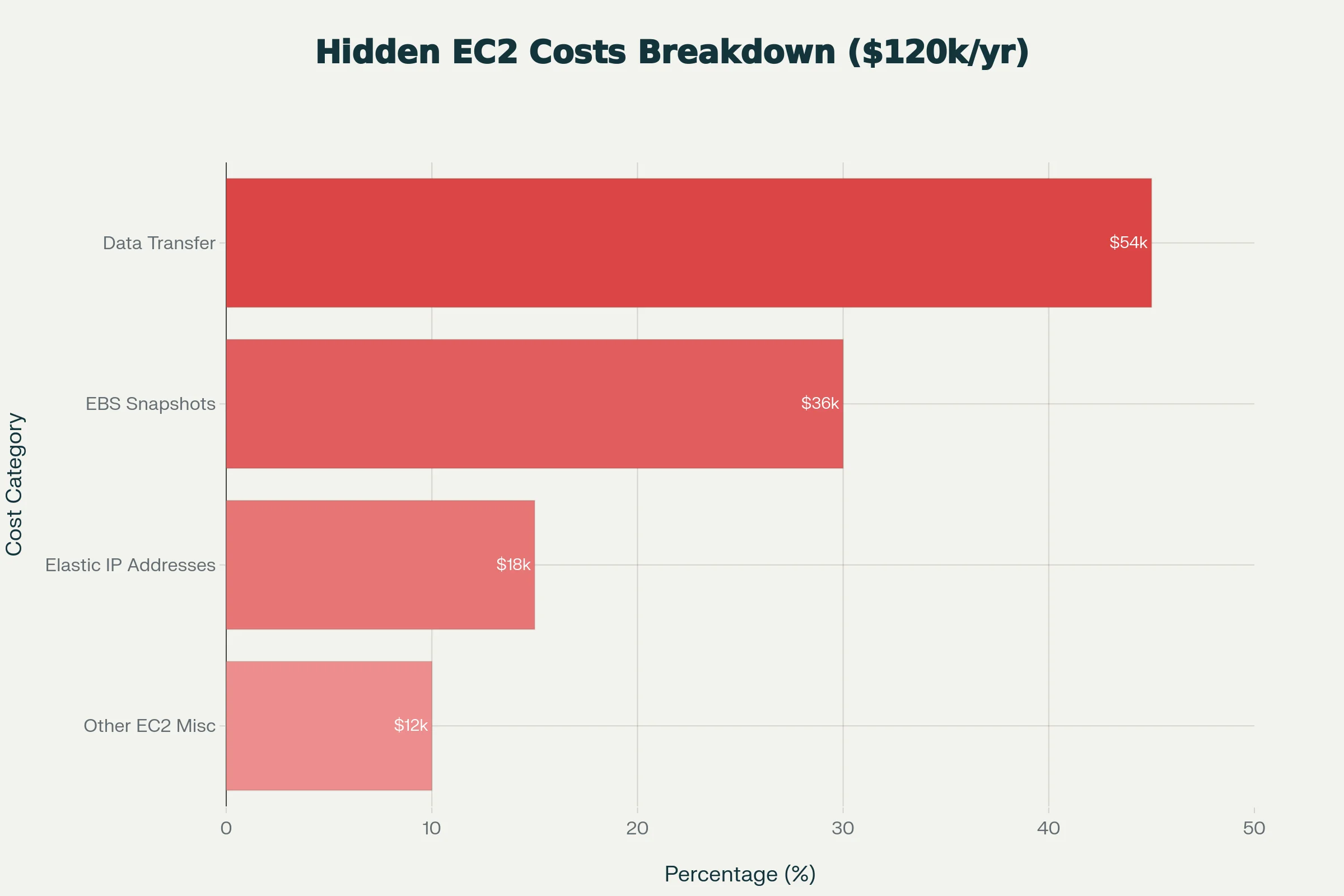
One documented audit found data transfer alone made up 45% of an enterprise's EC2 "Other" costs, $54,000 a year on a charge nobody knew existed. For AI teams pulling large training datasets, transferring checkpoints across regions, or serving inference globally, this is usually the single biggest surprise on the invoice. For a full picture of how AWS GPU pricing compares to alternatives, see the AWS, GCP, and Azure GPU alternative guide. Our deeper breakdown of GPU cloud egress and data transfer costs walks through how to model this fee before you sign with a provider, not after the first bill.
Idle and forgotten resources
The cloud's flexibility cuts both ways. The same APIs that let a developer spin up a test environment in seconds let that environment sit untouched for months. A full audit usually surfaces:
- Unused Elastic IPs: $3.60/month each when unattached
- Unattached EBS volumes: $0.05-$0.10/GB-month
- Aged snapshots and AMIs: $0.05/GB-month, often gigabytes per project
- EC2 instances left running over weekends and holidays
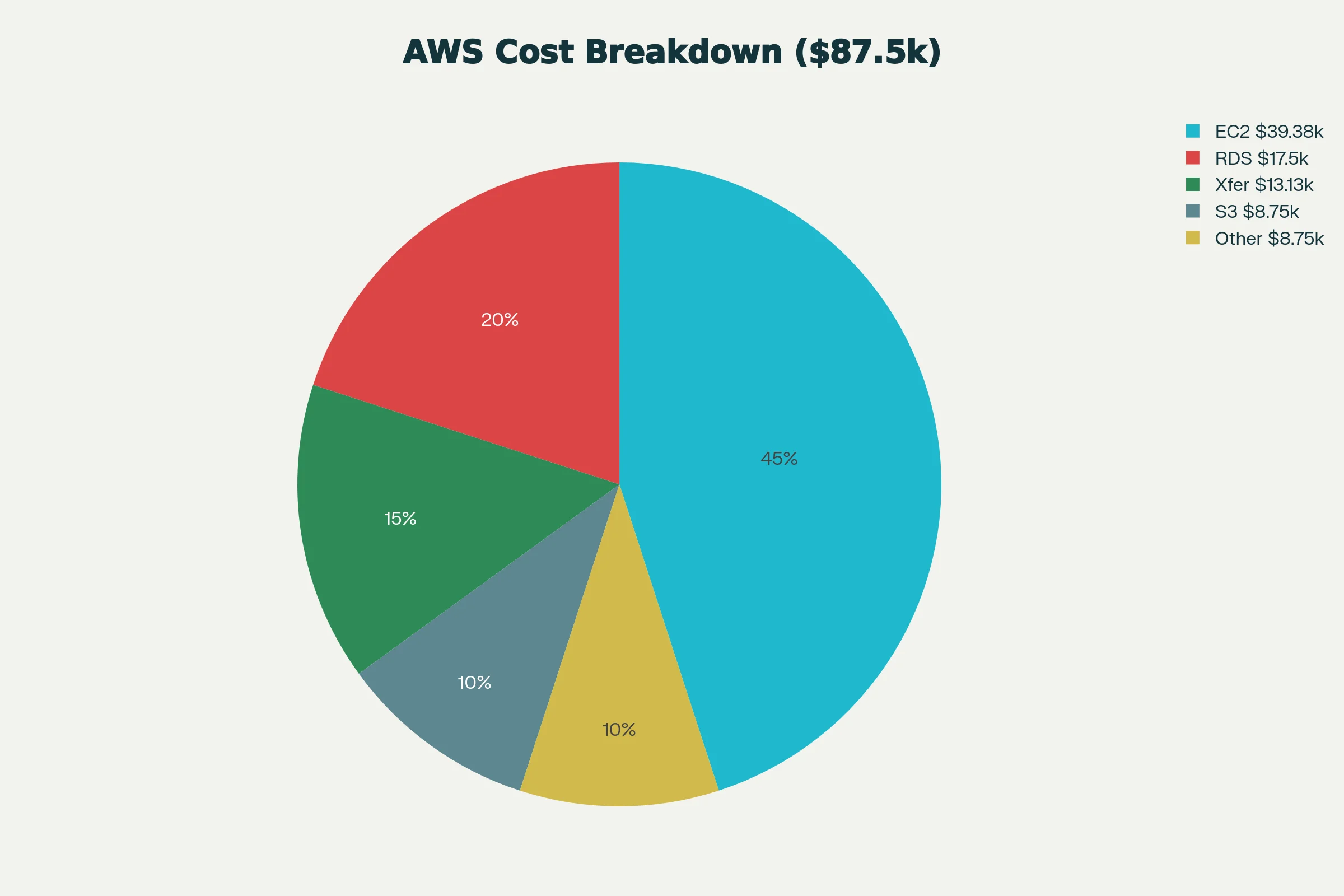
One audited case put EC2 "Other" at $120,000 annually, 20% of total EC2 spend. The breakdown: data transfer $54K, EBS snapshots $36K, Elastic IPs $18K, miscellaneous $12K. None of those line items were budgeted.
Auto-scaling gone wrong
Auto-scaling does what you tell it to. If your policy is sensitive enough to spin up dozens of instances on a temporary spike, it will. One gaming company saw a misconfigured scaling policy run up $1 million in charges before anyone caught it. Without guardrails, alerts, and kill switches, auto-scaling turns from a cost saver into a faucet.
Reserved Instance mismanagement
Reserved Instances can save up to 72% versus on-demand, but the savings depend on accurate capacity planning. Teams that over-commit pay for capacity they don't use; teams that under-commit pay on-demand premiums. Many organizations buy RIs sized for peak load, then hit 40-60% utilization in practice, wasting almost half the RI value. A simpler fix for teams that keep guessing wrong is to skip the commitment entirely and run baseline load on on-demand instances with per-minute billing until the utilization pattern is actually known.
Development and testing sprawl
Every developer spinning up their own environment, every QA team creating multiple test configurations, every CI/CD pipeline generating temporary resources. Without governance, the environment count grows on its own. Research consistently shows 30% of EC2 instances in typical orgs are oversized for the actual workload, and one audit found development environments running at 32% utilization while sized for peak.
Strategies That Actually Reduce AWS Spend
Tag everything, enforce the tags
Visibility is the foundation. Mandate tags for owner, project, environment, cost center, creation date, and intended lifespan. AWS Organizations + Service Control Policies enforce the rules; Cost Allocation Tags let you slice spend by team. Without tags you can't tell signal from noise in Cost Explorer.
Set up budgets and anomaly detection
AWS Budgets, Cost Explorer, and CloudWatch are free. Set budgets at multiple levels (org, account, project, service) with alerts at 50%, 75%, and 90%. Turn on Cost Anomaly Detection. The single most valuable change: make the cost dashboard visible to the whole team, not just finance. Engineers fix what they can see.
Rightsize regularly
AWS Compute Optimizer and Trusted Advisor flag over-provisioned resources from actual utilization data. Schedule a monthly review and act on the recommendations. Instance sizing, database tier, redundancy choices all drift over time as workloads evolve. Rightsizing is a habit, not a project.
Automate cleanup
Use Lambda + CloudWatch Events to shut down dev instances outside business hours, delete old snapshots, and kill instances tagged temporary past their expiration. S3 lifecycle policies move cold data to cheaper tiers automatically. If you use Terraform, build expiration tags into the deployment workflow so cleanup happens by default.
Reshape data transfer patterns
Cross-region and cross-AZ transfers are where the egress bill hides. CloudFront in front of frequently accessed content cuts egress significantly. VPC endpoints for AWS service traffic avoid internet gateway charges. For data-heavy workloads, move compute to where the data is, not the other way around.
Govern access
Least-privilege IAM. SCPs in AWS Organizations to block expensive instance types or regions without approval. Approval workflows for large instances and reserved purchases. Share monthly cost reports publicly inside the team. The org-cultural piece does more than any tool.
Spot and Savings Plans
Spot saves up to 90% on interruption-tolerant workloads (batch jobs, containerized inference with fallback, hyperparameter sweeps). Savings Plans are RI-flexible: they apply across instance families and services, so they're harder to strand. For workloads where compute is predictable but not pinned to a single instance type, Savings Plans usually beat RIs on a risk-adjusted basis.
Where AWS Cost Optimization Hits a Wall: GPU Compute
The strategies above work for general workloads. They don't work as well for GPU compute, where the per-hour rates dominate the bill and the optimization levers are limited.
The math is simple. On AWS, an 8x H100 p5.48xlarge runs $55.04/hr on-demand after the June 2025 price cut, or about $6.88 per H100 per hour. Even with Reserved Instances or Savings Plans, the baseline cost doesn't drop enough to matter for most AI teams. A team running training jobs for two weeks a month is looking at $18K-$30K in compute alone, plus egress, plus storage. For a detailed AWS P5 breakdown including 1-year and 3-year commitment math, see the AWS H100 P5 pricing guide and the pricing page for live comparisons. Early-stage teams running on AWS Activate or a similar program should read this alongside our map of free GPU cloud credit programs, since the credit cliff hits hardest for teams that never planned their exit off the issuing cloud.
The egress problem is even worse for AI workloads than for general apps. Training datasets get pulled repeatedly. Checkpoints get moved across regions. Inference results get served globally. The same $0.09/GB rate that's irritating for a SaaS app is a real budget line for an ML team.
The Alternative for GPU Workloads
For AI infrastructure specifically, the cleanest cost fix isn't tagging or RI optimization; it's running GPUs somewhere built for them. Spheron aggregates capacity from 5+ providers and exposes it on a single per-minute billed catalog. Current Spheron rates on the same NVIDIA hardware:
- H100 SXM5: $2.64/hr on-demand, $2.21/hr spot (vs. AWS $6.88/hr)
- A100 80GB: $1.43/hr on-demand, $1.19/hr spot (vs. AWS $2.30/hr+)
- B300 spot: $7.47/hr with 288 GB VRAM on a single GPU
- Zero egress fees: pay nothing to move data in or out
See the full Spheron GPU rental catalog for live per-GPU pricing across every SKU.
Pricing fluctuates based on GPU availability. Spheron rates above are live as of 20 Oct 2026; other providers reflect their most recent published rates and may have changed. Check current GPU pricing → for live rates.
Beyond the per-hour rate, the operational picture is simpler. Full root SSH on every instance, bare-metal performance with no hypervisor overhead (typically 15-20% faster compute, 35% faster multi-node networking), pay-as-you-go per-minute billing, and standard SSH/Docker/CUDA tooling. For the cross-cloud migration mechanics, see the AWS, GCP, and Azure migration guide.
The Real Decision
For general AWS workloads, the controls in this post will save you significant money if you put the time in. Most teams cut 20-40% of cloud spend by getting tagging, monitoring, rightsizing, and lifecycle policies right.
For AI workloads, the calculation is different. The hourly rate dominates the bill, the optimization levers are thinner, and the alternative ecosystem has matured to the point where 60-75% savings are available on the same NVIDIA hardware. For workloads that don't have a hard dependency on AWS-specific services (SageMaker, FedRAMP, deep VPC integration), the math points one way. To see what that looks like in practice, see the GPU cloud pricing comparison 2026 and the rent vs buy 3-year TCO breakdown.
The underlying problem is that GPU cost allocation requires GPU-native tooling. The GPU cloud FinOps guide covers the full stack from tagging to per-team chargeback dashboards.
Every dollar saved on infrastructure is a dollar you keep for engineers, experiments, and product.
Stop paying AWS rates for GPU compute. Spheron's H100 and A100 instances cost 60-75% less with zero data transfer fees, bare-metal performance, and per-minute billing.
Frequently Asked Questions
The biggest culprits are data transfer fees (egress costs from $0.09-0.12 per GB), forgotten resources like unattached EBS volumes and Elastic IPs ($3.60/month each), misconfigurations in auto-scaling policies that create runaway instances, and unused Reserved Instances. Many organizations discover 27-45% of their cloud spend is pure waste from resources they forgot existed.
Use AWS Budgets to create monthly or custom spending limits with alerts at 50%, 75%, and 90% thresholds. Enable AWS Cost Anomaly Detection to flag unusual spending patterns in real time. Set up CloudWatch alarms for specific services. Most importantly, ensure your entire team can view the cost dashboard, not just finance. Visibility drives accountability.
GPU pricing varies significantly. AWS p5.48xlarge (8x H100) costs ~$55.04/hr on-demand, or roughly $6.88 per GPU per hour. Spheron H100 SXM5 is $2.64/hr on-demand and $2.21/hr on spot as of 20 Oct 2026. A100 80GB on Spheron is $1.43/hr on-demand or $1.19/hr spot, versus $2.50+/hr on AWS. The gap compounds on multi-GPU clusters.
EC2 data transfer (egress), EBS snapshots and old AMIs, unattached Elastic IPs, and misconfigured NAT gateways generate consistent surprise charges. For AI workloads specifically, cross-region data transfers are killer. One enterprise's audit revealed 45% of their EC2 'other' costs were data transfer alone, totaling $54,000 annually for a cost they didn't know existed.
Absolutely. Most AI workloads don't need AWS-specific features like proprietary services or massive egress-free tiers. GPU cloud platforms like Spheron provide simpler billing, zero egress charges, bare-metal performance without hypervisor overhead, and often lower total cost of ownership. The risk is low for containerized, standard ML pipelines. Lift and shift typically takes 2-4 weeks for most teams.
It's more than just the GPU hourly rate. Include egress costs ($0.08-0.12/GB on AWS), storage ($0.10-0.20/GB/month for fast storage), networking (some providers charge for cross-AZ traffic), and operational overhead. An 8x H100 cluster on AWS costs ~$55/hr plus data and ops. The same cluster on Spheron is $21.12/hr on-demand with zero egress and simpler operations.