What if you could run a model that competes with the top closed-source models on coding tasks? You could avoid per-token pricing, eliminate rate limits, and gain full control over your infrastructure.
Moonshot AI just made that possible with Kimi K2.5.
This open-source model packs 1 trillion parameters, processes images and video alongside text, and generates production-ready code from a single prompt. It's the strongest open-source coding model available today, and you can deploy it on your own GPUs.
This guide walks you through deploying Kimi K2.5 on Spheron using vLLM: from spinning up an 8-GPU node to running your first inference request. If you're comparing with other large models, see our detailed GPU memory requirements guide for context window and quantization tradeoffs.
What Makes Kimi K2.5 Different
Most open-source models trade capability for accessibility. Kimi K2.5 is different.
Built on a Mixture-of-Experts (MoE) architecture, the model contains 1 trillion total parameters but only activates 32 billion during inference. This design delivers frontier-level performance without requiring frontier-level compute for every request.
Technical Specifications
| Specification | Value |
|---|---|
| Total Parameters | 1 Trillion |
| Active Parameters | 32 Billion |
| Expert Count | 384 |
| Context Window | 256K tokens |
| Training Data | 15T+ mixed visual and text tokens |
| Memory Required | ~630 GB (INT4 quantization) |
The model ships in native INT4 format on Hugging Face, reducing memory requirements while maintaining output quality. Moonshot AI recommends 8-GPU nodes (H200, B200, or B300) for production deployments with full context support.
Benchmark Performance
Kimi K2.5 doesn't just compete with open-source alternatives; it challenges the best closed-source models.
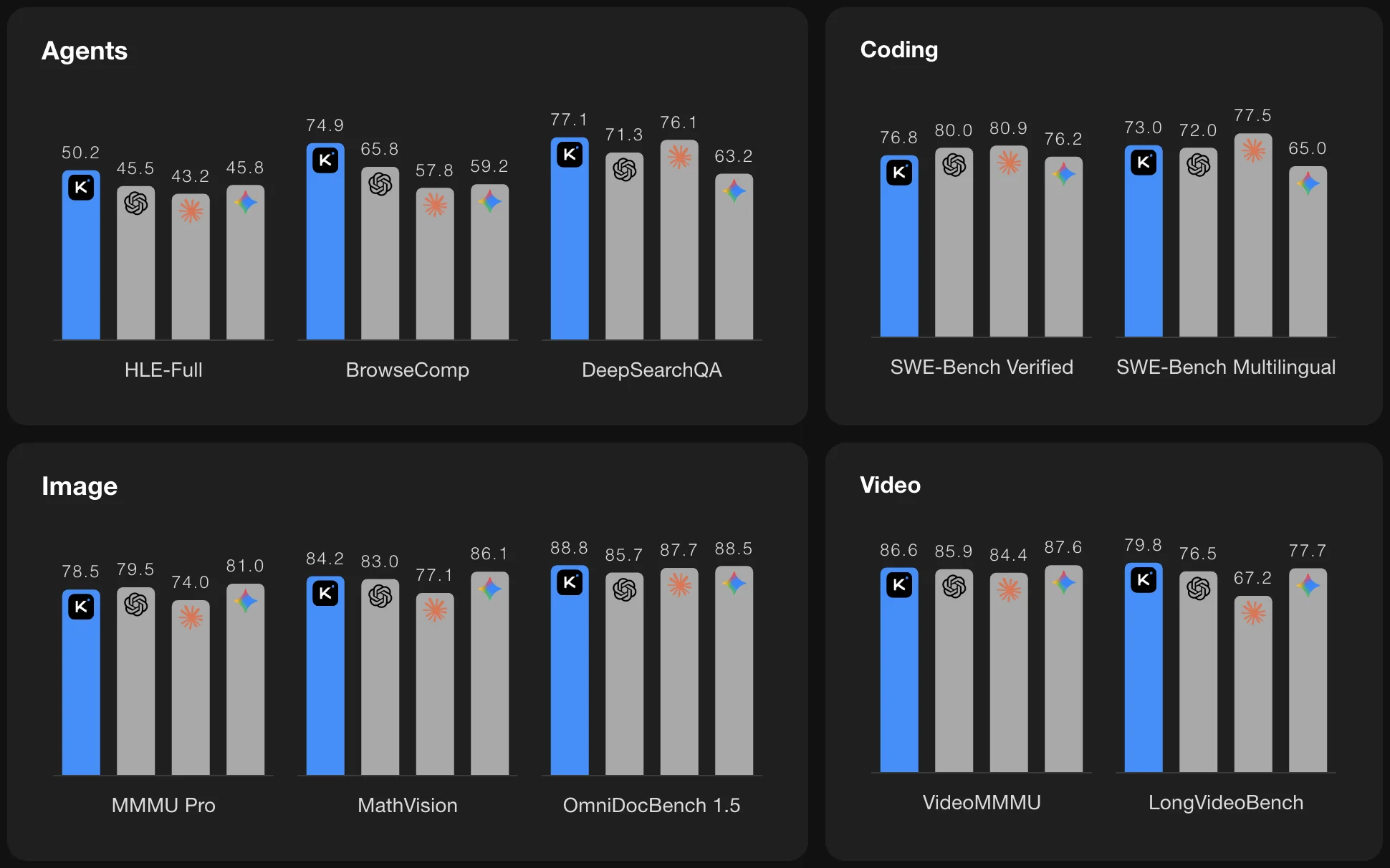
Across agent, coding, and vision understanding benchmarks, Kimi K2.5 competes closely with top frontier proprietary models. It leads on SWE-Bench Multilingual and LiveCodeBench, and leads every open-source alternative by a significant margin.
For teams that need coding capabilities without API dependencies, usage limits, or per-token pricing, this is the model to deploy.
Core Capabilities
Multimodal Coding: From Screenshots to Working Code
Kimi K2.5 accepts text, images, and video as input for code generation. This isn't just image recognition; it's visual reasoning that translates directly into functional code.
Image-to-Code: Upload a screenshot of any UI, and Kimi generates the implementation. Design mockups become React components. Whiteboard sketches become working prototypes.
Video-to-Code: Share a screen recording of an interaction, and Kimi writes the code to replicate it. This enables visual debugging workflows where you show the model what's broken instead of describing it.
The model uses ffmpeg for video decoding and frame extraction, processing visual input alongside your text prompts.
Front-End Development
This is one of Kimi K2.5's standout strengths.
From a single prompt, the model generates complete interactive interfaces, not starter templates, but production-ready code with:
- Rich animations and scroll-triggered effects
- Responsive layouts that work across devices
- Interactive components with proper state management
- Clean, maintainable code structure
Moonshot AI specifically highlights front-end development as a core strength. The model understands not just what you're asking for, but how modern web applications should be built.
Agentic Reasoning
Kimi K2.5 coordinates multi-step workflows autonomously. Feed it a complex task, and it:
- Breaks down the problem into subtasks
- Executes each step in sequence
- Handles errors and edge cases
- Delivers the final result
This makes it suitable for autonomous coding agents, research assistants, and any workflow that requires reasoning across multiple steps.
Document Generation
Through Agent mode, Kimi K2.5 creates professional documents directly from conversation:
- Long-form content: 10,000-word research papers, 100-page technical documents
- Structured data: Spreadsheets with Pivot Tables, formatted reports
- Technical documents: PDFs with LaTeX equations, properly formatted citations
- Presentations: Slide decks with consistent styling
The model handles formatting, structure, and content generation in a single pass.
Hardware Requirements
Running a trillion-parameter model requires serious GPU infrastructure. Here's what you need for production deployments with full 256K context support.
Recommended Spheron GPU Configurations
| Configuration | VRAM | Best For |
|---|---|---|
| 8x NVIDIA H200 | 1.13 TB | Production workloads, cost-effective |
| 8x NVIDIA B200 | 1.54 TB | High-throughput inference |
| 8x NVIDIA B300 | 2.30 TB | Maximum context + concurrency |
Storage: Minimum 500 GB for model weights download and storage. For more detail on multi-GPU strategies, see our 2026 GPU requirements cheat sheet and our comparison of the best NVIDIA GPUs for LLMs.
Load Time: Expect 20-30 minutes for initial model loading. The model weights need to be distributed across all 8 GPUs before inference can begin.
All three configurations provide sufficient memory for the INT4 quantized model with room for KV cache during inference. B200 and B300 offer additional headroom for higher batch sizes and longer context lengths.
Deploy Kimi K2.5 on Spheron
Step 1: Launch Your GPU Instance
- Log into your Spheron dashboard
- Select the GPU offer with 8x and click Next
- Select your GPU configuration:
- Set storage to 500 GB minimum
- Choose Ubuntu 22.04, Ubuntu 24.04, or another compatible base image
Step 2: Add the Startup Script
In the deployment configuration, add the following startup script. This automatically installs dependencies, downloads the model, and starts the vLLM inference server.
#!/bin/bash

# Exit on error
set -e

echo "--- Setting Up Environment ---"

# 1. Update and install venv
sudo apt-get update -y
sudo apt-get install -y python3-venv

# 2. Setup Virtual Environment
# Using /opt/kimi_venv ensures it is accessible and outside user home dirs
sudo python3 -m venv /opt/kimi_venv
source /opt/kimi_venv/bin/activate

# 3. Upgrade pip and install vLLM Nightly
pip install --upgrade pip
pip install -U vllm --pre \
    --extra-index-url https://wheels.vllm.ai/nightly/cu129 \
    --extra-index-url https://download.pytorch.org/whl/cu129

# 4. Start vLLM Server
echo "--- Launching vLLM Server ---"

nohup vllm serve moonshotai/Kimi-K2.5 \
    --tensor-parallel-size 8 \
    --host 0.0.0.0 \
    --port 8000 \
    --mm-encoder-tp-mode data \
    --tool-call-parser kimi_k2 \
    --reasoning-parser kimi_k2 \
    --max-model-len 262144 \
    --trust-remote-code > /var/log/vllm.log 2>&1 &

# 5. Wait for the server to become ready
echo "--- Waiting for server to initialize (ETA 30 mins) ---"

for i in {1..1800}; do
  if curl -s "http://localhost:8000/v1/models" > /dev/null; then
    echo "vLLM server is ready!"
    break
  fi

  # Only print status every 30 seconds to keep logs clean
  if [ $((i % 15)) -eq 0 ]; then
    echo "Still waiting for model to load... ($i/1800)"
  fi

  sleep 2
done

# If loop finishes and server isn't up, report error
if ! curl -s "http://localhost:8000/v1/models" > /dev/null; then
  echo "ERROR: Server took longer than 60 minutes to load."
  echo "Check /var/log/vllm.log for details."
  exit 1
fi
Step 3: Deploy and Monitor
- Click Deploy to launch your instance
- Once the instance is running, SSH into it:
ssh root@<your-instance-ip>- Monitor the startup progress:
tail -f startup.logThe model download and loading process takes 10-20 minutes depending on network speed. You will see progress updates every 30 seconds in the logs.
Step 4: Verify the Deployment
Once the server is ready, verify it is working:
curl http://localhost:8000/v1/modelsYou should see moonshotai/Kimi-K2.5 in the response.
Using Kimi K2.5
OpenAI-Compatible API
Kimi K2.5 exposes an OpenAI-compatible API through vLLM. Use it with any OpenAI SDK or HTTP client:
from openai import OpenAI

client = OpenAI(
    base_url="http://<your-instance-ip>:8000/v1",
    api_key="not-needed"  # vLLM doesn't require auth by default
)

response = client.chat.completions.create(
    model="moonshotai/Kimi-K2.5",
    messages=[
        {"role": "user", "content": "Write a React component for a sortable data table with pagination"}
    ],
    max_tokens=4096
)

print(response.choices[0].message.content)
Vision Capabilities
Send images for multimodal coding tasks:
import base64

def encode_image(image_path):
    with open(image_path, "rb") as f:
        return base64.b64encode(f.read()).decode("utf-8")

response = client.chat.completions.create(
    model="moonshotai/Kimi-K2.5",
    messages=[
        {
            "role": "user",
            "content": [
                {"type": "text", "text": "Recreate this UI in React with Tailwind CSS"},
                {"type": "image_url", "image_url": {"url": f"data:image/png;base64,{encode_image('screenshot.png')}"}}
            ]
        }
    ],
    max_tokens=8192
)
Tool Calling
Kimi K2.5 supports native tool calling for agentic workflows:
tools = [
    {
        "type": "function",
        "function": {
            "name": "search_codebase",
            "description": "Search the codebase for relevant files",
            "parameters": {
                "type": "object",
                "properties": {
                    "query": {"type": "string", "description": "Search query"}
                },
                "required": ["query"]
            }
        }
    }
]

response = client.chat.completions.create(
    model="moonshotai/Kimi-K2.5",
    messages=[{"role": "user", "content": "Find all API endpoints in my codebase"}],
    tools=tools,
    tool_choice="auto"
)
Performance Tuning
Adjust Context Length
The default configuration uses 256K context. For lower memory usage or faster inference:
--max-model-len 131072  # 128K context
--max-model-len 65536   # 64K context
Increase Throughput
For batch processing workloads, adjust these parameters:
--max-num-seqs 256             # Maximum concurrent sequences
--gpu-memory-utilization 0.95  # Use more GPU memory for KV cache
Troubleshooting
Server Not Starting
Check the vLLM logs for errors:
tail -100 /var/log/vllm.logCommon issues:
- Out of memory: Reduce
--max-model-lenor use GPUs with more VRAM - CUDA errors: Ensure NVIDIA drivers are up to date
- Download failures: Check network connectivity and available disk space
Slow Inference
If inference is slower than expected:
- Verify all 8 GPUs are being used:
nvidia-smi- Check for thermal throttling in the GPU stats
- Confirm tensor parallelism is active by looking for "8 GPUs" in the startup logs
Why Deploy on Spheron
Running Kimi K2.5 requires serious GPU infrastructure. Spheron provides the hardware and simplicity to deploy it without managing bare-metal servers yourself.
Full VM Access: Root control over your environment. Install custom CUDA versions, configure networking, and run any profiling tools you need.
Bare-Metal Performance: No virtualization overhead. Your workloads run directly on the GPU without noisy-neighbor effects or unpredictable throttling.
Cost Efficiency: Pay for GPU time without hidden egress fees, idle charges, or warm-up costs. Spheron pricing runs 60-75% lower than hyperscaler alternatives for equivalent hardware.
Multi-Region Availability: Access to H200, B200, and B300 clusters across 150+ regions. Scale up without waiting for capacity.
Conclusion
Kimi K2.5 brings closed-source-level coding performance to the open-source ecosystem. With 1 trillion parameters, 256K context, and multimodal capabilities, it handles everything from simple code generation to complex agentic workflows.
Deploying it on Spheron takes the infrastructure complexity out of the equation. Choose your GPU configuration, add the startup script, and you have a production-ready coding model running in under 30 minutes.
For teams building AI-powered development tools, autonomous agents, or any application that needs strong coding capabilities without API rate limits, Kimi K2.5 on Spheron delivers the performance and control you need. If you're deciding between Kimi K2.5 and other models, check out our DeepSeek V3.2 Speciale deployment guide for another frontier coding model option.